What it does
Separate cosmetic changes from meaningful ones
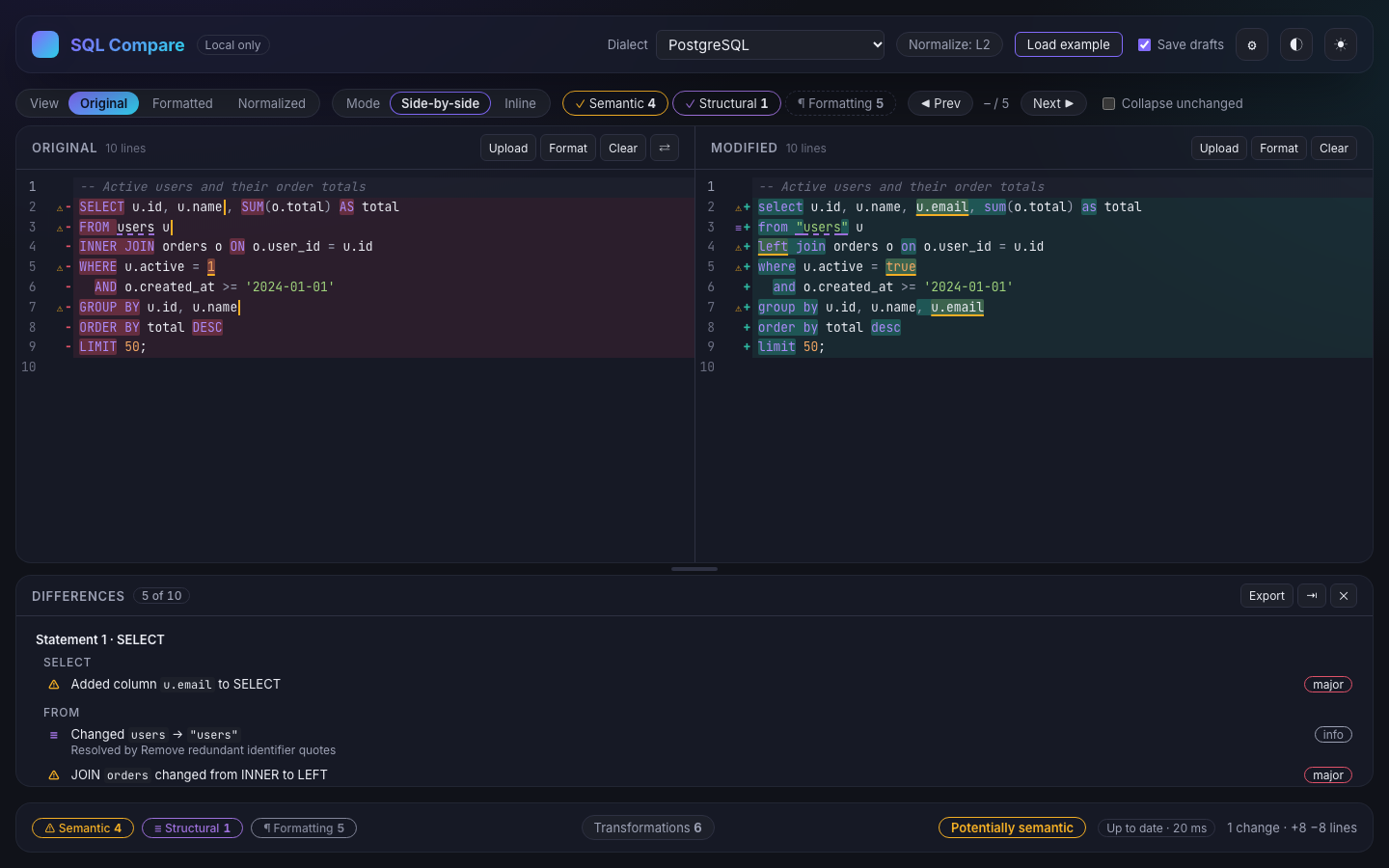
A plain text diff flags every reindent and every select that became SELECT. SQL Compare parses both sides, normalizes what is provably safe to
normalize, and classifies each remaining difference into one of three groups.
-
Formatting
Whitespace, comments or keyword case only. These are hidden by default so they don’t bury real changes.
Example:
select id → SELECT id -
Structural
The text is shaped differently, but the active normalization rules prove both sides equivalent. Each entry names the rule that proves it.
Example:
users → "users" -
Potentially semantic
A change that may alter what the statement does: columns, tables, join type or conditions, predicates, literals, ORDER BY / LIMIT, DML or DDL targets.
Example:
INNER JOIN → LEFT JOIN
Who it is for
- Developers reviewing a changed query in a pull request.
- Database engineers checking a migration script before running it.
- Anyone handed a “cleaned up” query who needs to confirm the logic didn't change.
- QA engineers and analysts comparing the SQL behind two versions of a report.
SQL diff, not database diff
SQL Compare compares two pieces of SQL text. It does not connect to a database, so it won't compare live schemas or table data. To see how two schemas differ, export each one as DDL and compare those files.
Supported input
Dialects, files and scripts
Choose the dialect that matches your SQL. Parsers run in a Web Worker, so typing stays responsive while the comparison updates.
| Dialect | Parser | What you get |
|---|---|---|
| PostgreSQL | The real PostgreSQL parser (libpg-query), compiled to WebAssembly | Formatting, normalization (L1 to L3) and structural diff |
| MySQL / MariaDB | node-sql-parser (MySQL build) | Formatting, normalization (L1 to L3) and structural diff |
| Generic | No parser | Formatting and token diff; only L1 rules apply |
- Paste, drop or upload. Each side accepts pasted text, a dropped file,
or the Upload button. Accepted file types are
.sql,.txtand.ddl. - Large files. Files over 5 MB still open, with a warning that the comparison may be slow.
- Encodings. UTF-8 and UTF-16 (with a byte-order mark) are detected. Files that aren't valid UTF-8 are decoded as Windows-1252, with a notice.
- Multi-statement scripts. Scripts are split into statements while
respecting strings, comments, PostgreSQL dollar quoting and MySQL
DELIMITERchanges, then aligned between the two sides.
Step by step
How to compare two SQL files
-
Open the tool
Go to sql-compare.allofcode.com. To see how it works first, click Load example.
-
Pick the dialect
Choose PostgreSQL, MySQL / MariaDB or Generic from the Dialect menu.
-
Add the original SQL
Paste it into the Original pane on the left, drop a file on it, or use Upload.
-
Add the modified SQL
Do the same in the Modified pane. The comparison runs as you type; there is no compare button.
-
Review the differences
Work through the Differences panel. Use the Semantic, Structural and Formatting filters to focus, and n / p (or F7 / Shift+F7) to jump between differences.
-
Export if you need a record
Export saves the report as Markdown, HTML or JSON, which is handy for a code review comment or a change ticket.
Reading results
What the result tells you
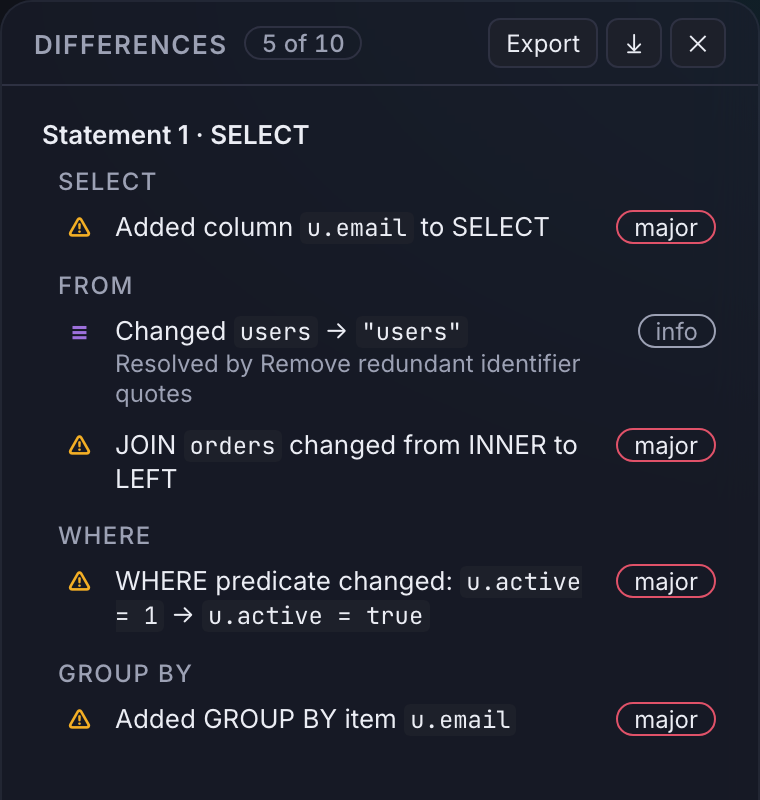
Differences are grouped by statement, then by clause
(SELECT, FROM, WHERE, GROUP BY and so on). Each entry says what changed in words, such
as “JOIN orders changed from INNER to LEFT”. Click an entry to jump to it
in the editor.
Severity
- major: can change which rows are read or written, or the schema.
- minor: changes the shape or presentation of the result, or metadata.
- info: formatting and structural differences.
Overall verdict
The status bar sums up the comparison as Identical, Formatting only, Equivalent (structural), Potentially semantic, or Unknown (unparsed SQL).
Views and layout
Switch between the Original text (editable), a Formatted version, and a Normalized version that shows what is left after the active rules. Diffs can be shown side by side or inline. On small screens the panes become Left, Right, Diff and Summary tabs.
Normalization
How SQL Compare decides two queries are equivalent
Normalization rewrites each statement into a canonical form before comparing. A rule is kept only if the re-parsed statement still matches the original's syntax tree, so it can't silently change the meaning.
- L1
Always on
Whitespace, comments and statement terminators. This is what “formatting” means.
- L2
Default
Dialect-aware rules such as keyword case, redundant identifier quotes, optional
AS,!=vs<>, and join keyword synonyms. - L3
Aggressive (opt-in)
Proves safe reorderings: AND/OR operands,
=, IN lists, GROUP BY, PARTITION BY and comma-joined FROM lists, but only when the operands have no function calls or subqueries.
L2 and L3 rules (and terminator handling) can each be switched off under Normalize. At L2, if aggressive mode would resolve a difference, the entry shows a hint: “may be structural under aggressive normalization”.
Never treated as equivalent
SELECT column order, ORDER BY items, UNION branches, outer-join order, numeric literal
form (1.0 vs 1.00), and AND/OR chains that contain function
calls or subqueries.
Known limitations
What SQL Compare doesn't do
Knowing the limits tells you when to reach for something else.
- It doesn't execute SQL or connect to a database.
-
It isn't schema-aware: it doesn't expand
SELECT *, check types or look up tables. - It doesn't compare query plans or performance.
- It doesn't prove every equivalence. Rewrites like turning a subquery into a join are reported as potentially semantic.
- Statements the parser can't read, such as procedural blocks, client commands or vendor extensions, are compared as text and treated as potentially semantic.
- Only PostgreSQL and MySQL / MariaDB are parsed. Other dialects (for example SQLite, SQL Server, BigQuery or Snowflake) can use Generic mode.
-
MySQL table names are compared case-sensitively unless you enable the
lower_case_table_namesoption. - There are no shareable links; reports are exported as files.
Privacy and data handling
Your SQL never leaves the browser
- Local processing. Parsing, formatting, normalization and diffing run in Web Workers on your device.
- No uploads, no analytics. The app's Content Security Policy only allows connections to its own origin, so SQL can't be sent to third parties.
- Works offline. After the first visit, a service worker caches the app so it runs without a network connection.
- Drafts in your browser. By default both inputs are saved to this browser's local storage so they survive a reload. Untick Save drafts to turn this off, for example on a shared computer.
Questions
Common questions about SQL Compare
Is my SQL uploaded anywhere?
No. Parsing, normalization and comparison all run in your browser. SQL Compare has no backend that receives your SQL, no analytics, and its security policy only allows network requests to its own origin.
Does SQL Compare run my queries?
No. It never executes SQL and never connects to a database. It compares the text and structure of the two inputs.
Can I compare whole migration scripts with many statements?
Yes. Multi-statement scripts are split into statements, and statements are aligned between the two sides by similarity, so moved and edited statements are matched up.
What does “potentially semantic” mean?
It means SQL Compare could not prove the two versions equivalent under the active rules. Many of these really do change behaviour, such as a different join type. Some may be equivalent rewrites that are beyond what the tool proves, so treat them as “review this”.
My database isn’t PostgreSQL or MySQL. Can I still use it?
Yes, with the Generic mode. It formats both sides and shows a token-level diff, but without a parser it cannot detect structural equivalence.
Does it cost anything or need an account?
No. SQL Compare is free to use and has no accounts.
Does it work offline?
Yes. After the first visit it is cached as an installable web app (PWA) and keeps working without a connection.
Ready to compare your SQL?
Paste two queries or drop two files. Nothing to install and no account to create.